Your Eyes Drift Backwards While You Read. A Visual Pacer Fixes That.
Re-read that sentence. Did you actually need to?
Probably not — but your eyes almost moved backward anyway. That near-automatic lurch is the quiet speed killer most readers never notice. Not a weak vocabulary. Not a short attention span. Just eyes that have never been given a clear instruction: keep going forward.
A visual pacergives them exactly that. It’s one of the oldest speed-reading techniques ever recorded, it’s validated by decades of eye-tracking research, and it works almost immediately — often within the first session.
Here’s how, and why.
The problem: your eyes wander backwards
Reading feels like a smooth, left-to-right process. Eye-tracking studies show it isn’t. The average adult regresses — moves their eyes backward to an earlier word or phrase — 10 to 20 times per 100 words read. Some of those regressions are deliberate: you genuinely missed something. Most are reflexive — a tiny flicker backward before you’ve even consciously decided you need to re-read anything.
Those reflexive regressions are expensive. Each one costs a fraction of a second. Multiply that across a 300-page book or a long research report and you’ve added minutes — sometimes tens of minutes — of reading time that produced zero additional comprehension.
A visual pacer solves this not by forcing your eyes to sprint, but by giving them a track to run on — a forward-moving anchor that makes wandering backward feel unnatural.
What a visual pacer actually is
A visual pacer is any moving guide that your eyes follow while you read. In its most basic form, it’s your finger tracing a line beneath the text as you move through it. In a more sophisticated form, it’s a digital highlight that scrolls across text at a controlled, consistent rate.
The technique predates modern speed-reading programs by decades. Reading teachers in the early twentieth century recommended the finger method as a way to keep young readers progressing forward. Evelyn Wood’s Reading Dynamics program — which launched in the late 1950s and eventually trained US presidents and congressional staff — built much of its curriculum around visual pacing. The core idea has stayed constant for over a hundred years: give your eyes an external anchor and they stop wandering on their own.
The science: fixations, saccades, and regressions
Your eyes don’t glide smoothly across a line of text. They jump in short, rapid bursts called saccadesand pause at each landing point to register what’s there. Those pauses are called fixations, each lasting roughly 200 to 250 milliseconds.
Slower readers tend to fixate on nearly every individual word — sometimes the same word more than once. Faster readers take in wider chunks per fixation: two, three, or four words at a glance. And they make far fewer backward saccades.
A visual pacer acts on both of these levers at once. It creates a steady forward pull that discourages single-word fixating, and it physically constrains the eye from jumping backward. The result is a cleaner, more efficient saccade pattern — and a reading speed that can increase without a corresponding drop in how much you take in.
Research on reading training programs consistently finds that visual tracking techniques produce speed gains that transfer to untrained material — meaning the habit sticks even after you put the pacer down, because your eyes have learned a new default pattern.
How to use a visual pacer
The finger method (start here)
Place the tip of your index finger below the first line of text. Move it steadily toward the right margin as you read — aim for a pace that feels slightly faster than comfortable. Your eyes will follow the finger almost involuntarily. At the end of the line, sweep smoothly to the start of the next and continue without pausing.
Don’t let the finger drift or hesitate — its role is to create a forward pull, not a resting point. The moment it stalls, your eyes stall with it.
The pen or stylus method
Same principle as the finger, but the tip provides a sharper, more precise anchor. Many readers find this easier for small print or dense academic text. If you’re reading on a tablet, a stylus works identically and keeps your hand off the screen.
The cursor method (for screens)
On a computer, drag your mouse cursor smoothly below each line as you read. It takes a little practice to maintain a consistent pace without accidentally clicking, but it’s effective for long documents where scrolling is unavoidable anyway.
What a smart digital pacer changes
Manual pacing works. But it has a ceiling. Your hand gets tired across a long session. Your speed drifts. Keeping a perfectly consistent pace through 50 pages of dense text takes more coordination than it sounds — and any inconsistency in the pacer weakens the effect.
A well-designed digital pacer removes all of that friction. Instead of tracking a moving finger, your eyes follow a highlight — a band of emphasis that moves through text at a precisely controlled rate that doesn’t waver, doesn’t tire, and doesn’t accidentally pause when you shift in your chair. You can increase the pace in small steps as your brain adapts, and ease back on dense material — all without breaking the reading flow.
ReadFast is built around exactly this idea. Its visual highlight moves through your documents at whatever speed you set, pushing your eyes forward and eliminating the reflexive backtracking that most readers never realise they’re doing. The app also pairs this with Bionic Reading mode — which bolds the first letters of each word so your brain anchors instantly on the right part of each word — making the pacer even more effective because your eyes spend less time searching and more time reading.
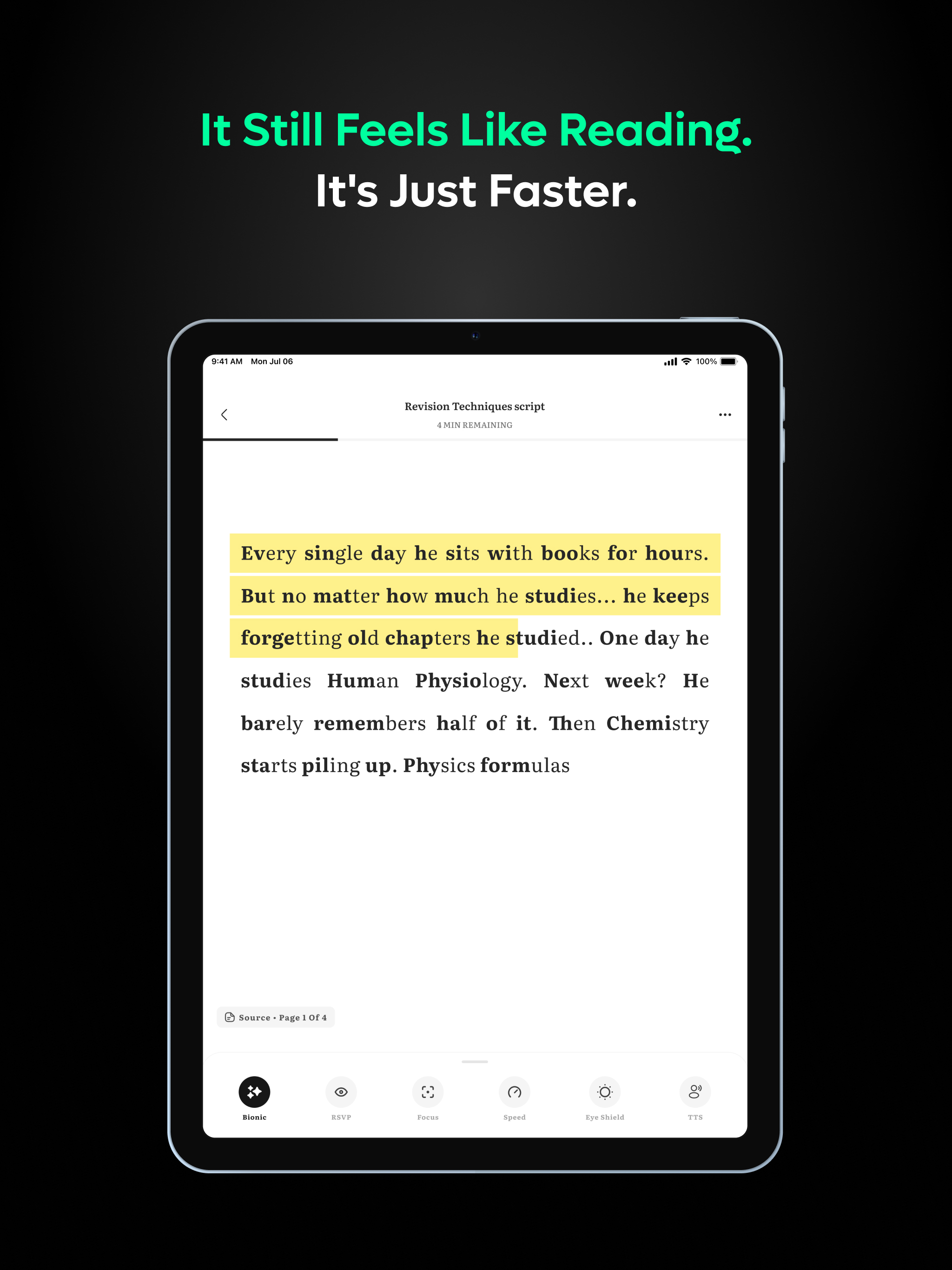
Import a PDF, set your pace, and within minutes you’ll feel the difference between reading with an anchor and reading without one. It’s not a subtle effect.
Try it right now
Go back to any paragraph in this article and read it again — this time, slide your finger steadily below each line at a speed that is just slightly faster than feels comfortable. Not so fast you lose the meaning. Fast enough that you can’t fully narrate every word.
Notice what happens: the urge to glance back drops almost immediately. Your eyes have somewhere to be. The text moves differently — not faster in a chaotic, anxious way, but smoother. More purposeful.
That smoothness is what a visual pacer trains into you. Practise it consistently and your eyes begin to move that way on their own — with or without a guide.
FAQ
Does a visual pacer actually help reading speed?
Yes — and the effect shows up quickly. Eye-tracking studies show most readers regress 10–20 times per 100 words, often reflexively rather than out of genuine need. A pacer physically prevents those unnecessary backward jumps, which alone produces measurable speed gains before you've even practised for faster reading.
What can I use as a visual pacer?
Anything that moves smoothly below the line works: your finger, a pen, a mouse cursor, or a highlight built into a reading app. The tool matters less than consistency — the goal is a forward-moving anchor your eyes follow rather than wander.
Will a pacer hurt my comprehension?
Not if you pace at or just above your natural speed. Comprehension only drops when the pacer is pushed well beyond what your brain can process — which is useful feedback that you're moving too fast for that material, not a fault of the pacer itself.
How long before I notice a difference?
Most people feel the difference within a single session. Backtracking drops almost immediately because the pacer physically blocks it. Speed gains compound over days and weeks as your brain adapts to the forward rhythm.
What's the difference between a manual and a digital pacer?
Manual pacers (finger or pen) work but require effort to keep consistent, and your arm can tire across a long session. A digital pacer built into a reading app maintains a perfectly steady rate regardless of page, adjusts speed in small increments as you improve, and can combine with visual cues — like progressive highlighting — that make tracking nearly effortless.